


How can a CFO use the e-conomic REST API to create a CFO dashboard?
Most CFO’s using e-conomic are still downloading Excel files, reformatting them, and building reports by hand every month. It works – but it is slow, error-prone, and means your numbers are always slightly out of date. We recently connected e-conomic directly to a CFO dashboard using the e-conomic REST API. The trickiest part for us was not the connection itself. It was getting revenue into the right month. e-conomic books revenue on the invoice date, but for management reporting we wanted it in the period the work was actually done.
If you manage your company finances through e-conomic as a CFO, you already know the platform holds a wealth of data: chart of accounts, booked invoices, accounting periods, customer balances, and more. What many CFO’s and companies have not yet explored is that all of this data is accessible programmatically through the e-conomic REST API – meaning you can pull it directly into your own CFO dashboards, automate reconciliations in your accounting, or build custom reporting tools tailored to your practice and finance team.
This blog is written for the tech savvy CFO or accountant and walks you through exactly how we do when building an internal CFO dashboard using the e-conomic REST API. We cover authentication, the key endpoints, how to handle pagination, and a real-world accrual pattern that took some careful thinking to get right.
e-conomic REST API
The e-conomic REST API is a well-structured JSON API hosted at https://restapi.e-conomic.com. It follows standard REST conventions and returns paginated collections for list resources. The endpoints most useful for financial reporting are summarised in the table below.
| Endpoint | What it returns |
|---|---|
GET / |
Company info and connection test |
GET /accounting-years |
All fiscal years on the account |
GET /accounting-years/{year}/totals |
Account closing balances for a full year |
GET /accounting-years/{year}/periods |
Monthly periods within a year |
GET /accounting-years/{year}/periods/{n}/totals |
Account balances for a specific month |
GET /accounts |
Full chart of accounts |
GET /invoices/booked |
All booked (finalised) invoices |
GET /invoices/booked/{id} |
Single invoice with line detail |
GET /customers |
Customer list with balances |
The API is read-heavy for reporting purposes. Write operations exist (creating invoices, entries, etc.) but are outside the scope of this guide.
Step 1 – Creating Your CFO App and Getting Tokens
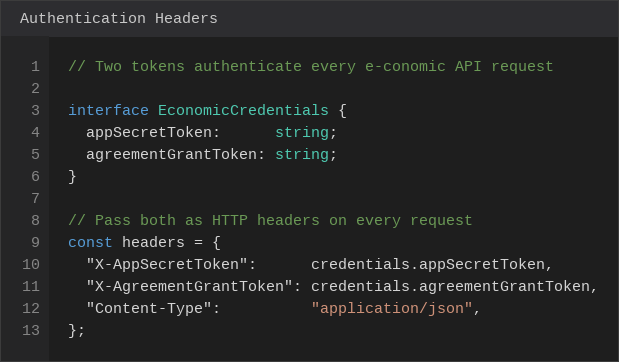
Authentication uses two tokens that you pass as HTTP headers on every request. There is no OAuth flow to manage – just two static strings.
X-AppSecretToken identifies your integration app. You create this once in the e-conomic developer portal at https://www.e-conomic.com/developer. When you register an app, e-conomic gives you an App Secret Token. Keep this private – it is equivalent to a password.
X-AgreementGrantToken identifies the specific customer agreement (i.e. the company whose data you are accessing). Each of your clients grants your app access from within their e-conomic account, and you receive a unique Agreement Grant Token per client. This means you can build one integration and connect it to multiple client companies by storing a token per client.
One important permissions note: when you register your CFO app in the developer portal, you choose an app role. If you later encounter 403 errors on certain endpoints (such as AccountingYear), it means your app role does not have access to that entity. Go to Settings → Integrations → Apps → your app → Role inside e-conomic and set the role to SuperUser to get full read access.
Step 2 – A Reusable Fetch Wrapper
Rather than repeating the authentication headers on every call, a small wrapper function handles this cleanly. The pattern below is what we use in production:
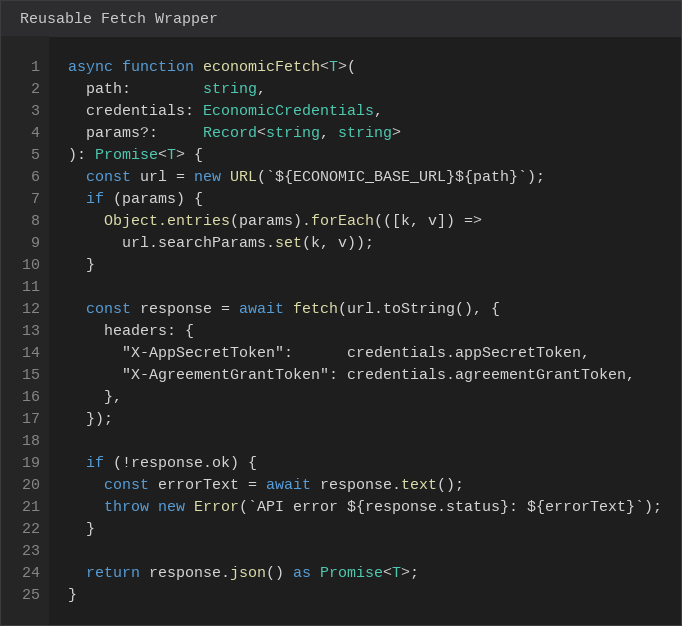
This wrapper accepts a path (e.g. /accounts), the credentials object, and an optional map of query string parameters. It constructs the full URL, attaches the authentication headers, and throws a descriptive error if the response is not successful. Testing the connection is then a single call to the root endpoint /, which returns the company name and confirms the tokens are valid.
Book a free introductory meeting with one of our accountants
Step 3 – Handling Pagination
Most list endpoints in e-conomic return a maximum of 1.000 records per page. The response envelope includes a pagination object with a nextPage URL when more records exist. A robust paginator follows that link until it is absent:
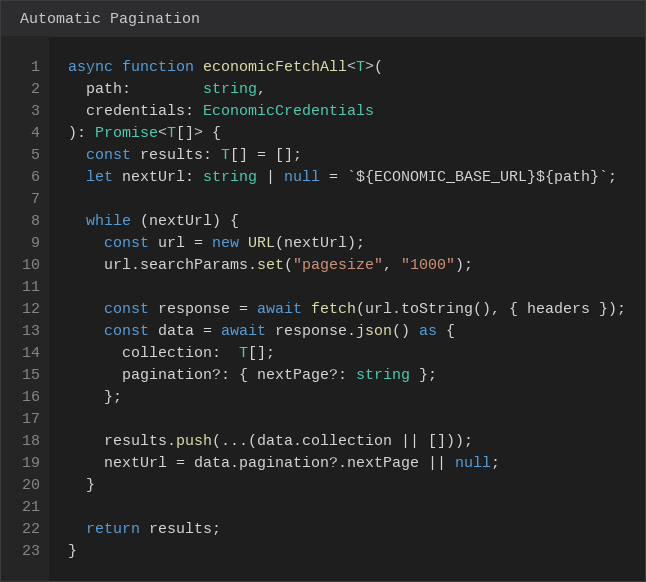
nextPage links automatically until all records are retrieved.The key detail is that nextPage is a fully-formed URL – you do not need to construct it yourself. Simply follow it as-is on each iteration. Setting pagesize=1000 on the first request reduces the number of round trips for large datasets. With this paginator in place, fetching the full chart of accounts or all booked invoices is a single function call.
Step 4 – Filtering Invoices by Date
The invoice list endpoint supports server-side filtering using e-conomic’s filter query parameter syntax. This avoids downloading thousands of invoices when you only need a specific period. The filter syntax uses $gte (greater than or equal), $lte (less than or equal), and $and to combine conditions:
GET /invoices/booked?filter=date$gte:2026-01-01$and:date$lte:2026-01-31You can also filter on customer number, currency, and other fields. The full filter reference is in the e-conomic REST API documentation. Always use YYYY-MM-DD format for dates – other formats will silently return empty results.
Step 5 – Fetching Invoice Line Detail
The list endpoint for booked invoices returns invoice headers only – date, customer, total amounts. To get the individual line items (which product was sold, for what amount), you need to fetch each invoice individually at /invoices/booked/{bookedInvoiceNumber}. For large volumes this is slow if done sequentially. The solution is to batch the requests in parallel groups of 50:
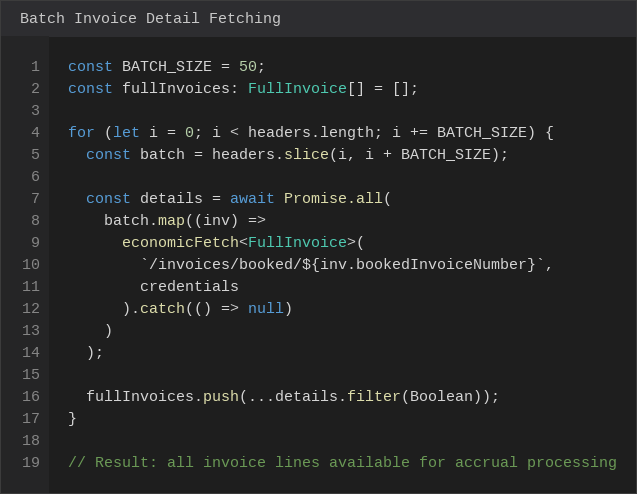
Batching in groups of 50 rather than all at once avoids hitting rate limits while still being significantly faster than sequential fetching. The .catch(() => null) on each individual request ensures that a single failed invoice does not abort the entire batch.
Step 6 – Classifying Accounts for P&L and Balance Sheet
Once you have the chart of accounts, you need to classify each account as either a Profit & Loss item or a Balance Sheet item. e-conomic provides an accountType field on each account, but the values are not always consistent across different company setups. A reliable approach combines the account type string with the account number range, which follows the standard Danish accounting plan:
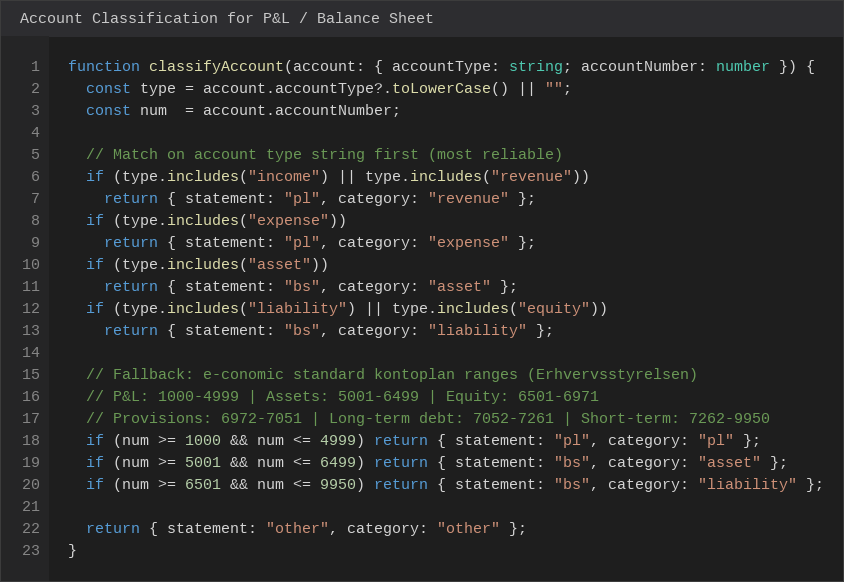
The ranges in the fallback logic are taken directly from the official Erhvervsstyrelsens standardkontoplan, which is the chart of accounts e-conomic ships by default. In that plan, accounts 1000 to 4999 cover the entire P&L (revenue, cost of goods, external costs, staff costs, depreciation, and financial items). The balance sheet begins at 5001: assets run from 5001 to 6499, equity from 6501 to 6971, provisions from 6972 to 7051, long-term liabilities from 7052 to 7261, and short-term liabilities from 7262 to 9950.
Step 7 – Accrual-Based Revenue Recognition
This is where things get interesting for many companies. e-conomic records revenue on the invoice date – the date the invoice was booked. But for management reporting, you often want revenue recognised in the period the work was actually performed, not when the invoice was raised.
Invoices in this example (your situation can of course be different) are typically raised in the month after the work was done. Each invoice line description contains a DDMMYY date stamp (e.g. 050226 for 5 February 2026) that indicates the actual service period. We parse this to assign each line to the correct accrual month:
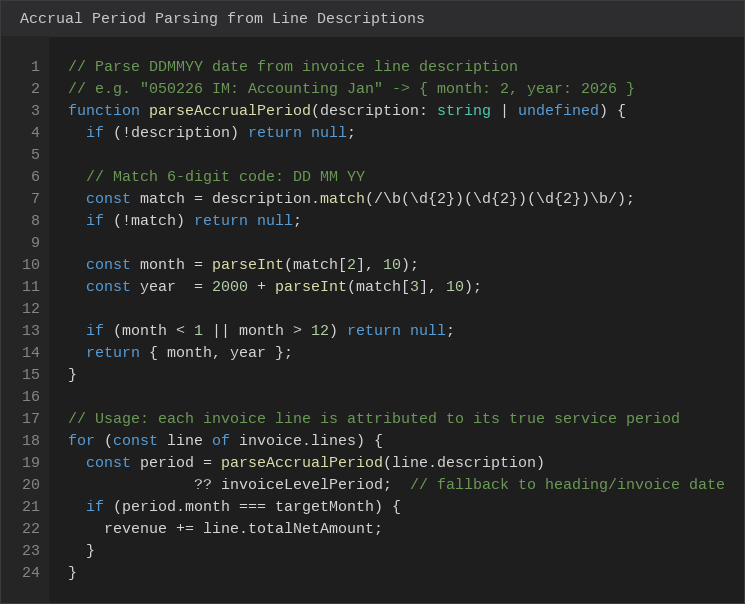
For lines without a date code, we fall back to parsing the invoice heading (e.g. "Services for February") and then finally to the invoice date itself. The result is that each invoice line is attributed to the correct month regardless of when the invoice was actually raised.
The practical consequence for fetching data in this example is that to get accurate revenue for, say, January, you need to fetch invoices from January, February, and March – because some January work will appear on February or March invoices. The accrual filter then picks only the lines that belong to January.
Storing Credentials Securely
Tokens should never be hardcoded or stored in plain text. In our dashboard, we encrypt them at rest in the database and only expose masked versions (showing only the last 4 characters) to the frontend. The actual tokens are only decrypted server-side at the moment of an API call.
The credentials flow in practice is straightforward. The user enters their two tokens in the Settings page. The server calls a connection test immediately to validate them, and on success stores the tokens encrypted in the database while saving the company name for display. All subsequent API calls retrieve the tokens from the database server-side – the frontend never sees the raw values. This pattern means that even if a browser session is compromised, the tokens themselves are not exposed.
Common Errors and How to Fix Them
The table below covers the errors you are most likely to encounter when first connecting.
| Error | Cause | Fix |
|---|---|---|
401 Unauthorized |
Invalid or expired token | Re-check both tokens in the developer portal |
403 Forbidden (E02500) |
App role lacks access to the entity | Change app role to SuperUser in e-conomic Settings |
429 Too Many Requests |
Rate limit hit | Add delays between batches; use pagesize=1000 to reduce calls |
Empty collection array |
Date filter returns no results | Check date format is YYYY-MM-DD; verify the accounting year exists |
| Pagination loop | nextPage URL handling issue |
Always use the nextPage URL directly without modification |
What You Can Build With This
Once the connection is working, the data becomes the foundation for a range of tools that go well beyond what e-conomic’s built-in reports offer. The dashboard we built uses this integration to produce a real-time Profit & Loss statement with month-by-month comparison and year-over-year charts, a Balance Sheet that refreshes automatically without any manual export, and a Sales Discrepancy Tracker that compares actual billed revenue (from e-conomic) against expected revenue (from CRM) per client, per month, and per service type – flagging the largest gaps at the top.
Beyond those core reports, the same data feeds a Cash Flow Forecast that uses the last 12 months of actuals to project the next 6 months using trend analysis, and a Budget vs Actual view where the CFO can enter budget figures directly in the dashboard and see variances update in real time. All of this runs on live data, refreshed on demand, with no manual exports or spreadsheet maintenance required.
Getting Started
The e-conomic REST API documentation is available at https://restapi.e-conomic.com and includes an interactive explorer where you can test endpoints directly against your own company data. The developer portal for registering apps is at https://www.e-conomic.com/developer.
If you are a CFO considering building a similar integration for your accounting and finance team, the patterns described here – authentication, pagination, batch fetching, and accrual-based recognition – cover the majority of what you will need to get started.
References
e-conomic REST API Documentation
e-conomic Developer Portal
e-conomic API Filter Syntax Reference
(This blog was updated: 19.3.2026)
FAQ
Do I need to be a developer to connect to the e-conomic REST API?
Not entirely, but you do need someone with basic programming knowledge to set it up. The API itself is well-documented and straightforward - authentication is just two tokens passed as HTTP headers, and the responses are standard JSON. A junior developer or a technically confident person or accountant who is comfortable with TypeScript or Python can get a working connection running in a day. The more complex work is in the data logic: classifying accounts correctly, handling pagination, and getting the accrual periods right. That is where experience with accounting data structures pays off.
What are the two tokens and where do I get them?
The first is the App Secret Token, which identifies your integration. You create this once by registering an app in the e-conomic developer portal at e-conomic.com/developer. The second is the Agreement Grant Token, which identifies the specific company whose data you are accessing. You generate this from within your e-conomic account by granting your app access.
Is it safe to connect a third-party tool to my e-conomic accounts?
Yes, provided you handle the tokens responsibly. The tokens should be encrypted at rest in your database and never exposed to the browser or included in frontend code. In our example, the raw tokens are only decrypted server-side at the moment an API call is made, and the frontend only ever sees a masked version showing the last four characters. The e-conomic API is also read-only for the use cases described in the blog - we never write, modify, or delete any data in e-conomic.
What happens if someone revokes access?
If a someone revokes the Agreement Grant Token from within their e-conomic account, all subsequent API calls using that token will return a 401 Unauthorized error. Your integration should handle this gracefully by catching the error and displaying a clear message to the user that the connection needs to be re-established. You would simply grants access again from your e-conomic settings and get the new token.
How much data can I pull at once, and are there rate limits?
Each list endpoint returns up to 1.000 records per page, and the API provides a nextPage link in the response when more records exist. For most companiecs, the full chart of accounts and a month of invoices will fit in a single page. For larger companies with thousands of invoices, the paginator described in the blog will handle this automatically. e-conomic does enforce rate limits, and the most common way to hit them is by fetching individual invoice details sequentially. Batching requests in parallel groups of 50 - as described in Step 5 of the blog - keeps you well within the limits in practice.
Why does the blog recommend fetching three months of invoices to get one month of revenue?
Because e-conomic records revenue on the invoice date, not the service date. In many companies, work performed in January is invoiced in February or even March. If you only fetch January invoices, you will miss the revenue from work done in January but billed later. By fetching January, February, and March invoices and then filtering each line by its accrual period (parsed from the date code in the line description), you capture all revenue that belongs to January regardless of when the invoice was raised. This is the difference between cash-basis and accrual-basis reporting.
What if our invoice line descriptions do not contain a date code?
The date code convention (a six-digit DDMMYY stamp at the start of the line description) is specific to how some structure invoices. If your company uses a different convention, the accrual parsing logic needs to be adapted to match your format. Common alternatives include parsing a month name from the invoice heading (e.g. "Services for February"), using a custom field on the invoice, or simply falling back to the invoice date for companies that bill in the same month as the work is performed. The blog describes all three fallback levels in order of priority.
Can I use this to build a Budget vs Actual report?
Yes, and it is one of the most valuable reports you can build on top of this integration. The actuals come directly from e-conomic via the API. The budget figures are entered manually by the CFO (or pulled from another system) in your dashboard and stored in your own database. The comparison is then a straightforward calculation per account, per month. Because the actuals refresh on demand from e-conomic, the variance figures are always current without any manual export or data entry on the accounting side.
Does this work for clients who use e-conomic in multiple currencies?
The API returns amounts in the currency of each transaction, along with the exchange rate at the time of booking. For consolidated reporting across multiple currencies, you need to decide on a reporting currency and apply either the historical rate (from the transaction) or a period-average rate. The API does not perform this conversion for you - it is something your reporting layer needs to handle.
How long does it take to build something like this from scratch?
A basic working connection that can fetch accounts and invoices and display a simple P&L takes roughly one to two days for an experienced developer. Getting the accrual logic right, handling edge cases in account classification, and building a polished dashboard with proper error handling and credential management is more like two to four weeks of focused development. The patterns described in the blog - the fetch wrapper, the paginator, the batch fetcher, and the accrual parser - are the core building blocks, and having them documented clearly cuts the initial development time significantly.